Are you looking to create an email newsletter but don’t know where to start? With the right tools, you can take your email marketing strategy to the next level without spending a dime.
Newsletters are an essential part of any effective email marketing strategy. Nearly any business can benefit from knowing how to create one.
Whether you’re a small business, an e-commerce giant, or anything else, email newsletters can help build lasting relationships with your clients.
And the best part? You can create your email newsletter without spending a single penny! With the right tools and guidance, you can start sending out professional-looking newsletters that engage your audience and drive results.
Why do you need to collect email addresses?
Everyone is competing for your email. Do you want to sign up for Facebook, YouTube, Instagram, or other social media? They want your email; if you want to find a job, they will ask you to provide your email address.
In this post, I will outline the steps to create an email newsletter in nine straightforward steps.
Before we move on, let me answer some of your questions. Tell me in the comments section below if I didn’t specifically address your question.
What is an email newsletter?
An email newsletter is a type of email that has both text and media and is sent to a list of customers, prospects, and subscribers to keep them updated on company or product news, tips, and developments.
What is the best software for creating an email newsletter?
This is not a simple question to answer. Many excellent email marketing services exist, including high-end ones like Infusionsoft.
They are excellent but very complicated to understand and very expensive. You must hire somebody to do it for you or dedicate much time to learning how to use them.
Furthermore, there are lower-end email marketing services, like MailChimp, which are free to start but have a very complex design.
So, considering the services’ price and ease of use, Kit is the best software for creating an email marketing newsletter.
Can I start an email newsletter for free?
Yes, you can start an email newsletter for free. ConvertKit offers a free two-week trial (also, they have a free plan; all you need to do is register using your email). No credit card is required; you can get your Kit account.
What is an email marketing strategy?
Email marketing is part of your overall marketing strategy and business plan. It helps you market your products and services using the email channel with the best chances of profiting and reaching your goals.
Why do I need to start a newsletter?
There are many reasons to start a newsletter; here, I will list and discuss a few.
You have more control
There are many ways to build a list online. You can start a YouTube channel, and your subscribers are your list.
You can gain followers on Instagram, Facebook, and other social media, but you don’t control them.
A policy change or an algorithm change can wipe out all your followers in the blink of an eye.
When you have your own email list, you gain more control; if the autoresponder company decides to shut you down for any reason, they will allow you to download your list.
There is no limit to how many of your subscribers you can reach
Most social media platforms will limit your organic reach. Even if you have 10,000 YouTube subscribers, publishing a new video will only reach some.
If you have 10,000 email subscribers, they all get your email, so you don’t need to pay to reach more people.
Higher return on investment
Research concluded that you will earn around $40 for every $1 you invest in email marketing. Email marketing is a very lucrative business, so every company seeks your email address; you should also pursue this opportunity.
Ability to print money
This is one of the most powerful aspects of email marketing: you can print money from thin air.
Imagine you have 10,000 people on your mailing list, wake up in the morning, and realize that you need $5,000 as soon as you get the chance because of an emergency.
You sit down, and in 20 minutes, you find a product that costs $100, and they pay you 50% in commissions.
You study the product and become convinced that it will benefit your audience. You write an email to your list, recommending the affiliate product you found.
If only 2000 people open your email and 1000 of them click your affiliate link, that is 1000 clicks to the offer.
If just 100 of those who clicked your affiliate link make a purchase, you will have enough money to cover your emergency expenses (this amount could increase if you have a good relationship with your audience and the offer includes upsells).
You can’t do this right away, but if you learn email marketing, you’ll be able to do it regularly.
Forget about $5,000 days; you can do this and pull in a lot of $100 days, and in my opinion, this is enough to have a good life in most parts of the world.
9 Steps To Start an Email Newsletter For Beginners
So these are the nine steps to start email marketing, especially if you’re a beginner.
Step 1: Figure out the topic of your newsletter
The easiest way to find a topic for your newsletter is to find a skill and teach it to your subscribers.
The good news is that you do not need to be an expert to teach people online. You just need to be one step ahead of people who will read your newsletter.
You find a skill that you know or want to learn, document your process for how you do it, and share it with the world.
People will relate to you and heed your advice if you share your experiences, struggles, and successes.
I know a lot of people who want to make money online, but they need more skills. This is why most people will never make it as content creators.
You see, posting quotes daily will make you famous and gain more followers, but to make real money, you must teach people something and provide value to them.
Some of the skills you can learn are
- Affiliate marketing
- Search engine optimization
- Video editing
- Thumbnail creation
- Content marketing
- Cryptocurrency
- Becoming a better male or female.
- Becoming fit
- Cooking
- Coding
- Building funnels
It is any skill you can teach or educate others.
Step 2: Pick an email marketing platform
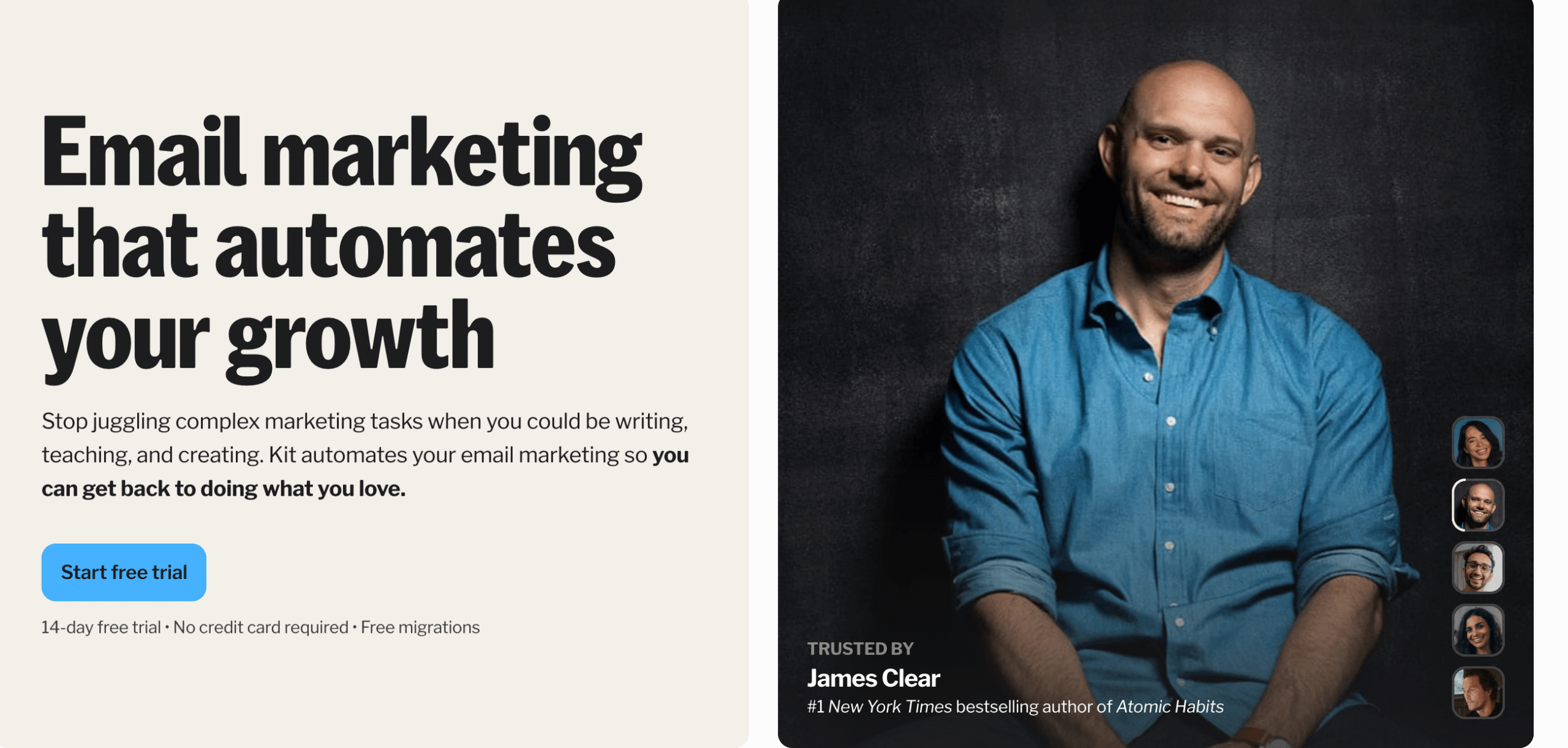
Earlier in this post, I discussed the best email marketing platform, Kit. This is it if you want a simple design, powerful automation, and a modern email marketing platform for content creators.
Kit offers a 14-day trial and $39 per month for up to 1000 subscribers; remember, the cost increases as the number of subscribers increases.
If you do not have money for now, you can use a free option of up to 10,000 subscribers.
Step 3: Set up a website and a professional email address
It does not matter if you use YouTube, a podcast, Facebook, or any other marketing channel. You need a website as the central hub of your online business.
To create a website, you need a domain name. The easiest domain name you can get is your name; go to namecheap.com and buy a domain name for less than $15.
You will also need a hosting service. If you are starting, I recommend WPX hosting. They are fast, reliable, and relatively cheap.
You can install WordPress using your domain name. If you can’t do this, please let me know, and I will help you install a WordPress site for free.
Furthermore, you will need to set up a professional email address. When you use a free email address like Gmail.com or Hotmail.com, your emails are likely to end up in a spam folder.
Having an email address like yourname@yourname.com will increase trust, and it is more professional.
You can use Google Workspace to create your professional email address.
You can read here how to start a blog.
Step 4: Create a lead magnet
The fourth step is building a lead magnet; this is a part that most people ignore but is very important.
You need to bribe your prospects to join your list ethically, and you need to find your audience’s main problem and offer them something that will help them solve it in exchange for their email list.
A lead magnet does not have to be complicated. You can create a one-page PDF checklist on foods you never eat to lose weight or a PDF on five steps to build your email list.
Your lead magnet should be practical, easy to consume, and concise.
You can also use a video, audio, or even an article as your lead magnet, and you don’t need to overcomplicate this. Just do it.
Step 5: Build a Squeeze page or Opt-in Form
So now you have an email marketing platform and a lead magnet ready; the next step is to create an opt-in form to give away your lead magnet. You will need to connect your opt-in form to your email marketing platform.
I always recommend asking for an email address in exchange for a lead magnet, but if you want to add personalization, you can ask for a name, too. Please don’t ask for their phone number or zip code; remember, less is more.
This strategy works: prospects visit your website and find a landing page offering a lead magnet. He/She thinks that it is precisely what he/she needs.
They give you an email address and get added to your email marketing platform, instantly giving them a thank you message with a download link.
Step 6: Invite people to join your newsletter
You probably expected me to say you should learn Facebook Ads, YouTube Ads, open a Pinterest Account, etc…
While those things are wonderful and I use them myself, when you’re just getting started, I always recommend engaging with friends, family, and the Facebook Groups you’re already in and inviting them to join your email list first.
Then, ask them to share your newsletter with someone who might enjoy it!
If you’re not willing to invite people you already know to join your email list, then it’s probably not ready for you to spend money on growing it through advertising just yet.
Step 7: Create a Welcome message and a Soap Opera Email Sequence
After your prospects opt in, you must send them a thank-you message. This message is to introduce yourself to your prospects, thank them for getting your lead magnet, tell them what they can do with it, give them the download link, and tell them what to expect from you. That is the primary purpose of your first email.
After creating a thank-you email, you must create and set up a Soap Opera Sequence.
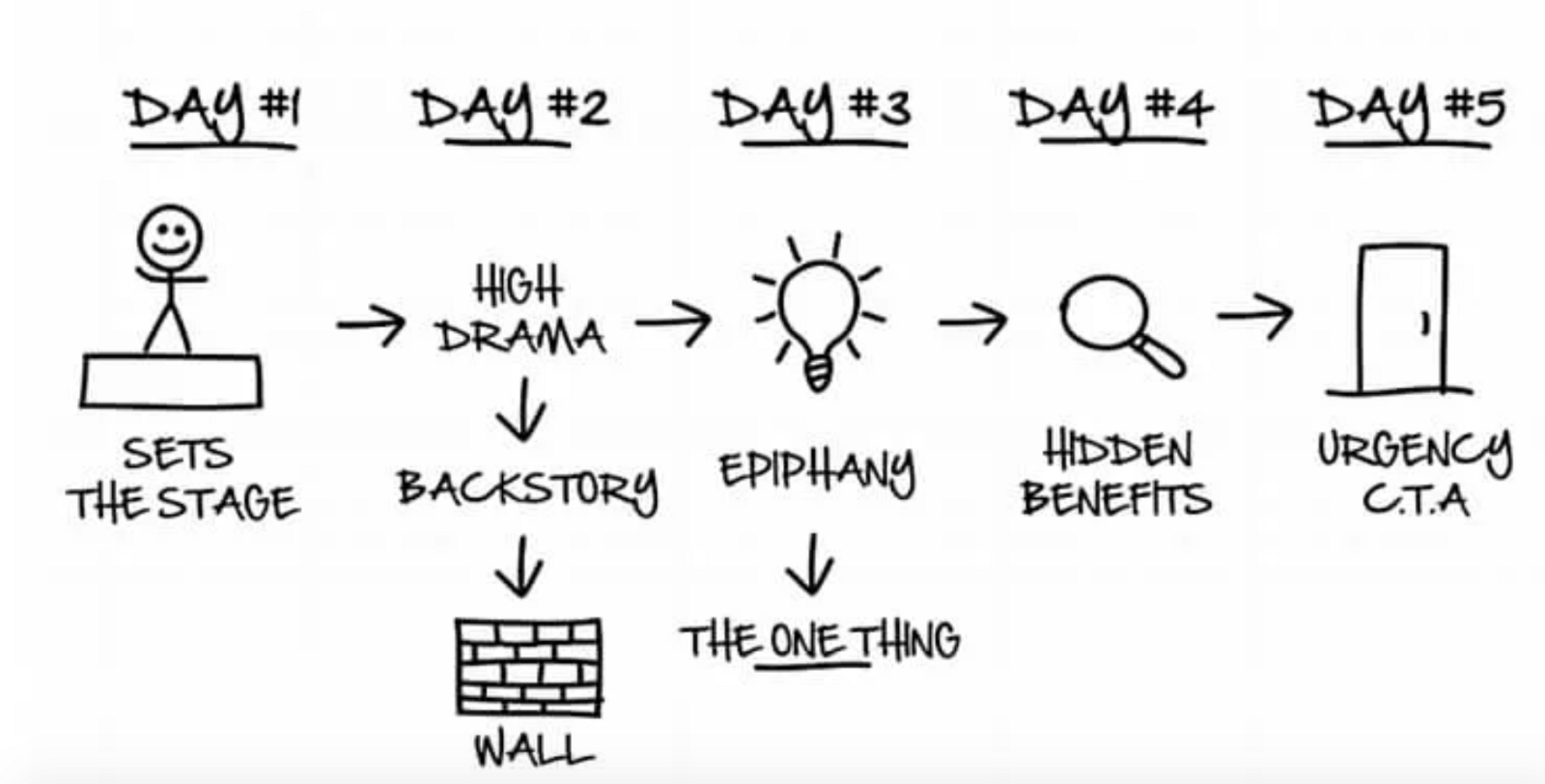
In a few words, a Soap Opera Sequence (SOS for short) is a sequence of emails that move subscribers through a serialized narrative, like this: In the example above, SOS #1 is a sequence of 4 to 5 emails. … The main aim of this sequence is to introduce you and your services/products to your prospects
I learned this method from Russell Brunson in his famous book DotcomSecrets, which you can download for free here.
Step 8: Send Seinfeld emails
Do you remember the famous sitcom Seinfeld? It was a comedy sitcom about nothing, and there was no pre-written script. All they used to do was make episodes about their daily life.
For example, if they went to the coffee shop, any event that occurred would be turned into an episode; the same applied if they visited a restaurant or hospital. They made a whole series about nothing.
Seinfeld emails are essentially emails that focus on trivial topics; ironically, they are effective. When writing a Seinfeld email, connect with people in your writing while subtly leading them to your products and services, too.
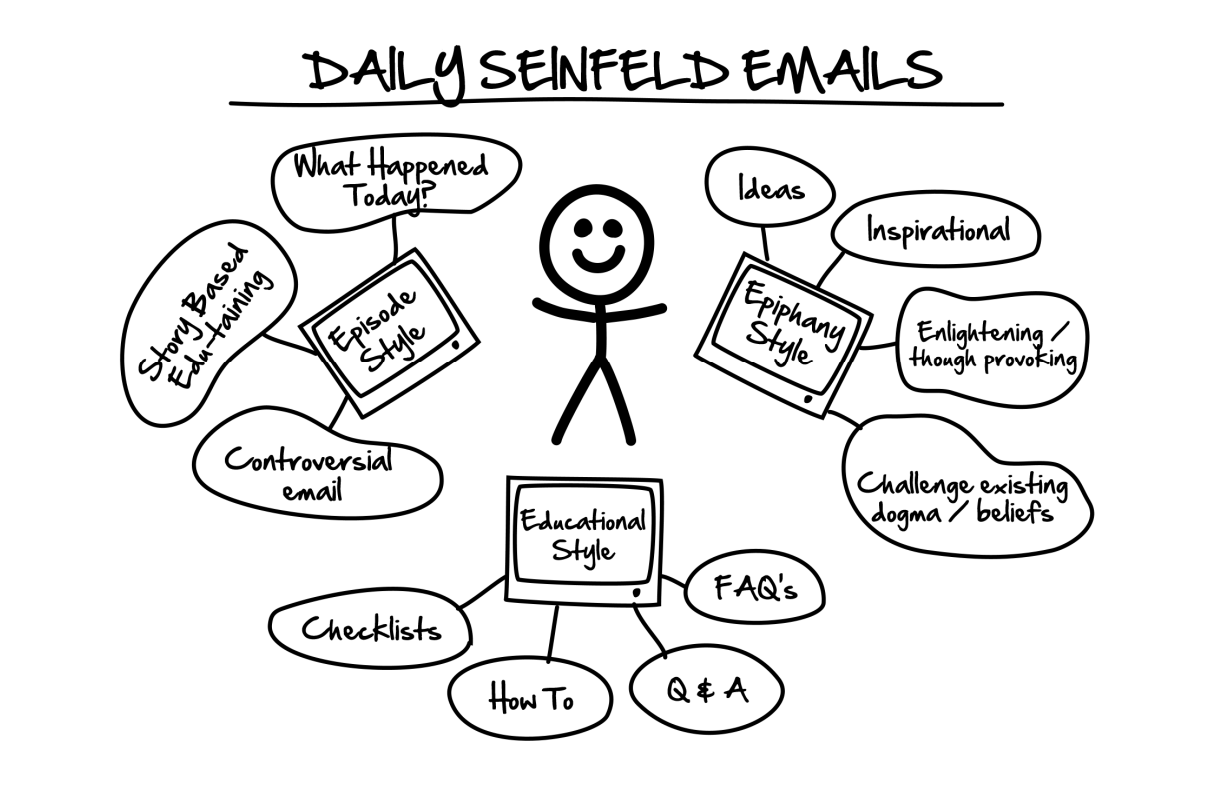
These can be your content, conversations with people on social media or in daily life, or trending news of the day. They can be anything.
The main thing is that you need to connect each email to the product you are promoting. This is like making money without being too pushy.
People will be entertained, and they will buy through your link, and you will make much more money.
I also learned this from Russell Brunson’s famous book DotcomSecrets, which you can get here for free.
Step 9: Track newsletter performance
This is how to create a newsletter. Your work’s not over yet, though…
Reviewing your newsletter’s performance is an essential part of an effective email marketing strategy. Metrics like open rate, click-through rate, unsubscribe rate, and bounce rate must be tracked.
Open rate
The email open rate indicates the percentage of recipients who have opened your campaign. For example, if 100 contacts receive your email and only 50 of them open it, the open rate is 50%.
Click-through rate
The click-through rate represents the percentage of recipients who clicked a link in your email, but only for those who opened it.
For example, if you email 100 contacts, 50 of them open it, and 25 of these openers click a link, your click-through rate is 50%.
Unsubscribe rate
The unsubscribe rate tells you the percentage of recipients who clicked to unsubscribe from your emails in a campaign.
For example, if 100 contacts receive your email and 5 choose to opt out of future emails, your unsubscribe rate is 5%.
Bounce rate
The bounce rate refers to the percentage of emails that fail to deliver because they were returned by the recipient’s server. For example, if out of 1,000 emails, 5 bounce, then the bounce rate is 0.5%.
Soft bounces
The email temporarily fails to deliver because the recipient’s server is down or their mailbox is full.
Hard bounces
The email will never be delivered. (Email address is incorrect or no longer exists.)
Key Takeaways: How to create an email newsletter
This is how to create your very own email newsletter!
- Step 1: Figure out the topic of your newsletter
- Step 2: Pick an email marketing platform
- Step 3: Set up a website and a professional email address
- Step 4: Create a lead magnet
- Step 5: Build a Squeeze page or Opt-in Form
- Step 6: Invite people to join your newsletter
- Step 7: Create a Welcome message and a Soap Opera Email Sequence
- Step 8: Send Seinfeld emails
- Step 9: Track newsletter performance
Newsletters are an excellent way to engage with your clients, expand your brand’s reach, and increase sales. Without a doubt, they are an essential part of any effective marketing strategy.